
- eMule has been the leading P2P file-sharing client since 2002, with a powerful global network and credit system.
- It combines two networks (eD2K and Kad), fragmented downloading, and advanced verification to offer quality, security, and content variety.
- It's still useful for finding rare or out-of-print files, and its open community and development ensure stability and support.
Have you ever wondered what eMule really is and how it has managed to remain one of the most iconic file-sharing programs in the history of the Internet? Although the boom in P2P downloads seems a thing of the past and today streaming platforms have taken over, the reality is that eMule remains a reference for those looking to share files efficiently, anonymous and with a loyal community This article is a comprehensive guide in Spanish, aimed at both those curious about digital nostalgia and those who want to understand how it works and why it remains useful today. It integrates all available information from reference sources and provides up-to-date and practical context.
Get ready for a historical and technical journey that will take you through the birth and evolution of eMule, its inner workings, the networks it uses, the myths and realities, and how to install and use it today. No detail is left out here: if you're looking for the most extensive explanation of eMule to resolve any questions, you've come to the right place. And, of course, all the links and references lead you to official sources so you can delve as deeply into the topic as you wish.
What is eMule and where does it come from?
eMule is a P2P (peer to peer) software designed for file sharing between users around the world. Since its launch in 2002, has positioned itself as a true benchmark in the digital ecosystem, being considered by many as the legitimate successor and alternative to the famous eDonkey2000 client.
Where does its name come from? The term eMule It is a play on words that refers to "Electronic Mule» (electronic mule), in clear allusion to «electronic donkey"(eDonkey) that starred in the previous software. The story begins when Hendrik Breitkreuz, a German developer known by the nickname Merkur, decided that he could greatly improve the performance of the original eDonkey2000 client. Along with a growing group of contributors, built an open source alternative which soon surpassed the original in functionality and popularity.
The original goal of eMule was to radically improve the file sharing experience: sought to offer more stability, ease of use, new search functions, chat integration and above all a open and community model that allowed thousands of users and developers to contribute. Thanks to this, eMule not only became the most famous client for the eDonkey network, but also encouraged the emergence of mods, alternative versions, and clients based on its code, even spreading to other operating systems.
How eMule evolved: from P2P dominance to global community
The history of eMule is that of a software that has known how to adapt to technological changes and legal ups and downs. Between 2003 and 2009, P2P networks experienced their golden age thanks to programs like eDonkey, eMule, Ares, Kazaa, Napster, and BitTorrent. However, eMule managed to differentiate itself for its stability, transparency, and community, attracting millions of users worldwide, especially in Spain, Germany, Italy, and France.
At its peak popularity, The eMule network reached between 5 and 10 million simultaneous users., according to download and connection statistics. Even today—albeit with lower numbers—it still has a loyal user base, mods in development, and sporadic updates from the community.
One of the factors that have allowed eMule's longevity is the fact that it is free software under GPL license, which means its source code is public, anyone can modify it, and there are actually dozens of alternative mods and clients. Examples such as aMule (for Linux and Mac), eMule Plus, MorphXT, and Xtreme have extended the project's lifespan and innovation.
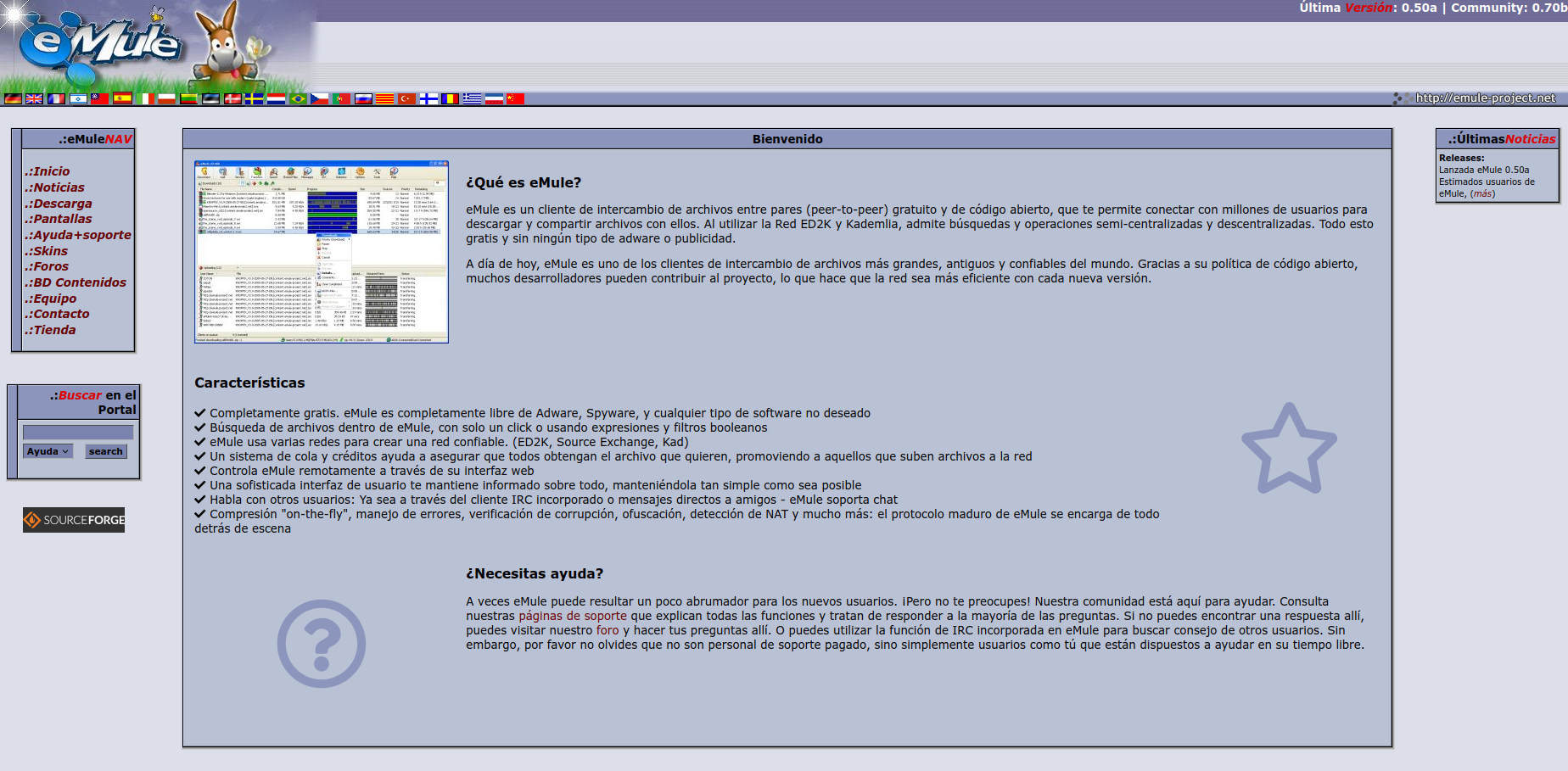
To see the vitality of eMule and the diversity of its community, just visit the official website of the eMule project, where you can find downloads, forums, and updated guides.
How does eMule work? Technical keys and networks involved
The basis of eMule is the point-to-point (P2P) connection: Users—called "clients"—share files stored on their computers directly with each other, without the need for a central server to host these files. This not only reduces the risk of network congestion, but also makes the network more secure. resistant to attacks and falls.
To achieve this efficient and decentralized exchange, eMule uses two main networks:
- eD2K Network (eDonkey2000): This classic structure uses a client-server system, where there are servers that act as indexes of files and connected users. Files are located and requested through these servers, but they are never stored there: they simply facilitate the connection between users who have them and those who want to access them.
- Kademlia Network (Kad): Introduced later, Kad is a completely decentralized network, inspired by the DHT (Distributed Hash Table) protocol. Here, each client acts as a node and stores parts of the global index, allowing users to continue searching and downloading files even if all eD2K servers go down.
To this basic architecture we must add key features such as: the credit system (which favors those who share the most), the ability to connect simultaneously to both networks, bandwidth modulation, integrated IRC chats, anti-counterfeiting and comment systems, and a host of extras that have appeared over time.
Internal structure of file sharing in eMule
To understand the true potential of eMule, it is essential to understand how file sharing works:
- List of servers: Upon startup, eMule connects to a list of servers (either configured by default or added manually) or directly to the Kad network. These servers ONLY store information about which users have which files, but do not host the files themselves. The user can update this list of servers with reliable URLs recommended by the community.
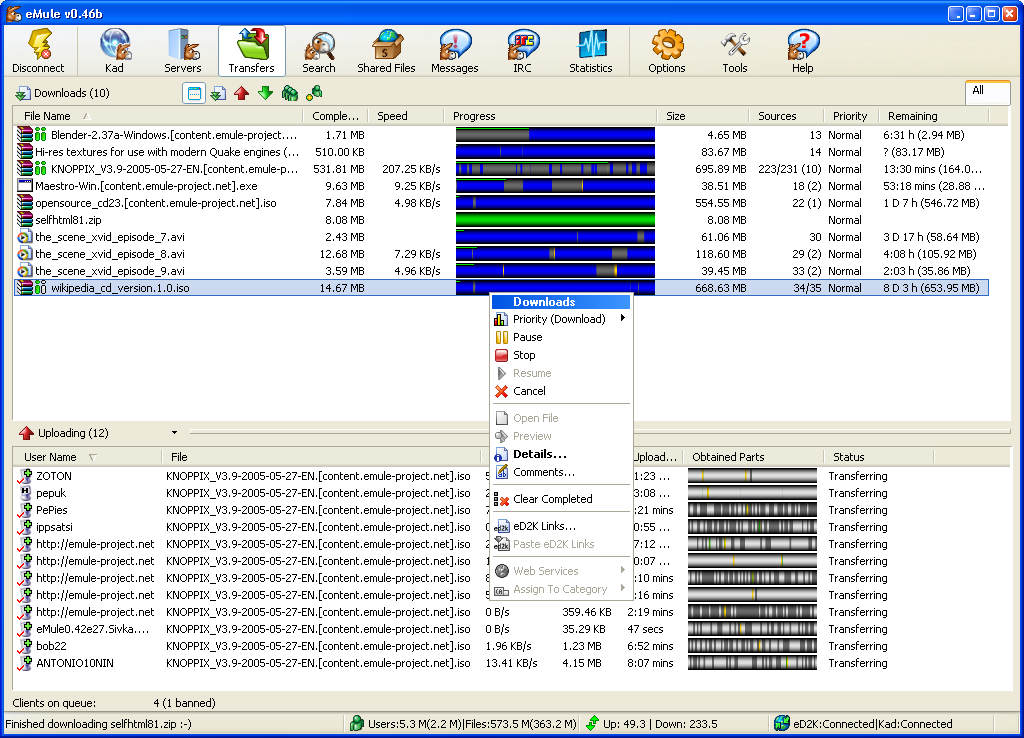
- File search: You can use the built-in search engine, enter filters, search by file type, name, size, etc. The result is a list of available files and the number of "sources" or people who have the file.
- Simultaneous download from multiple sources: eMule splits files into small chunks and downloads them in parallel from several available sources. So, even if a user has a slow connection, combining all sources can speed up the download of the complete file.
- Queue and credit system: There's a queue for each file that controls who can download at any given time. Users who have shared the most tend to move forward faster. This prevents the network from becoming clogged with "peeping Toms" who only download and never upload.
- Error checking and recovery: Each downloaded part is verified using hashes (AICH and MD4), ensuring file integrity. If corrupted parts are detected, only the affected blocks are downloaded, not the entire file.
- Comments and ratings: Users can leave ratings and reviews about the quality of files, helping to identify corrupted, counterfeit, or low-quality materials.
- Identity management, high and low ID: Depending on the port and firewall configuration, eMule assigns a high (better connectivity) or low ID. Correct router configuration improves performance by allowing unrestricted incoming connections.
- Protocol obfuscation: Since recent versions, eMule allows you to "camouflage" traffic to avoid blocking by some Internet providers.
What makes eMule different from other P2P programs?
The key to eMule's success was going far beyond simple downloading.In addition to its open source software policy and active community, it incorporates advanced features that still make it attractive today:
- Total absence of advertising and malware, something not so common in other P2P clients.
- Advanced management of multiple downloads at once and file prioritization.
- Intuitive and customizable user interface, with statistics, graphs and detailed configuration options.
- Support for multiple languages —more than 40—thanks to the international community.
- Mod and variant support, adapting to different needs and operating systems.
- Integrated IRC chat to communicate with other users, ask for help, or discuss downloads and technical issues.
- Media file preview (for example, to verify a video before downloading it completely).
- Remote control via web interface, ideal if you want to manage eMule from outside your home.
And not least: The credit and queue system promotes fair exchange, promoting a balanced and collaborative use of the system.
Why is eMule still useful today?
While most popular content (recent movies, mainstream music, major releases) has migrated to BitTorrent networks or is available for streaming, eMule remains irreplaceable for:
- Search for rare, old, or discontinued files that no longer circulate on the main torrent trackers or are in the cloud.
- Share files privately, communally, or in affinity groups, taking advantage of the decentralized network and the credit system.
- Avoid the risks of infected trackers, intrusive ads, or fake downloads present on many torrent and direct download websites.
- Use free, secure, and malware-free tools, unlike other P2P clients that have fallen into disuse or become corrupted.
The eMule community is still active, and there are forums, IRC channels, and official websites where you can find help, updated servers, and configuration tips. Plus, thanks to its open-source nature, Mod versions and community patches continue to improve the program. although its original development is slowed down.
eMule's in-depth technical features
Supported platforms and requirements
eMule works under systems Windows —from older versions to the most recent ones— and there are alternatives such as aMule for GNU/Linux and Mac OS X. It is recommended to run it on computers with a broadband connection and certain ports open on the router for optimal performance.
License, open source and community
Since its origins, eMule is a free software project under the GPL licenseThis has allowed dozens of developers to create modifications, adaptations, and improvements based on the original. Thanks to this openness, the eMule "family" includes not only the classic client, but also dozens of mods, forks, and variants adapted to different systems and needs.
Supported networks: eD2K and Kad
- eD2K Network: It uses central servers to index sources and files, but these servers do NOT store the content; they merely serve as "yellow pages." You can manually update the server list from trusted sources to avoid landing on fake or compromised servers.
- Kademlia Network (Kad): It provides decentralized operation: each client is both a user and a "mini-server." If the eD2K network were to disappear, Kad would allow file searching and sharing without relying on centralized points.
Queue and credit system
One of the most important innovations of eMule is the credit systemFor every file you upload to others, your client earns credits against that specific user, which moves you through their queue faster when you need to download a file from them. This encourages fair sharing and collaboration.
Protocol and security
eMule uses the TCP and UDP protocols to manage connections between users and servers. It also integrates obfuscation mechanisms to prevent blocking by some network operators, as well as file verification systems to prevent corruption and malicious manipulation.
Features that have made eMule great
- Advanced font management: Fragmented download from multiple users, simultaneous search on both networks (Kad and eD2K), and automatic server updates.
- File comments and ratings: You can see reviews about the file's quality and authenticity before you start downloading, minimizing the risk of fake and malicious files.
- IP address filters and spam: eMule allows you to block certain suspicious or excluded IP addresses for spam, security, or legal reasons.
- Previewing media fragments: You can play a video or audio before it has fully downloaded, ideal for avoiding false downloads.
- Integrated IRC client: It allows you to participate in support channels, share experiences, and solve problems thanks to the community.
- Web Servers and Remote Control: Using passwords and pre-configuration, you can control eMule from outside your local network.
- Multilingual system: Almost every language is supported by volunteer translators.
- Comprehensive statistics: Complete dashboard with data on sources, transfers, shared files, and network speed.
- Extension via mods: You can download variants that offer more features, optimizations, or new visuals.
What are eMule mods? Main featured variants
Partly thanks to their open source software model, they have emerged dozens of alternative versions or mods that add functionality, optimize the network, or customize the experience. Some of the most popular mods are:
- eMule Plus: One of the first improved versions, with a new interface and additional options.
- MorphXT: Very popular mod for introducing bandwidth control systems, security improvements and visual customization.
- Extreme: Focused on transfer optimization and advanced credit and queue management.
- Phoenix, ScarAngel, Stullemule, Dreamule: Other mods with specific functions for advanced users.
- aMule: Cross-platform alternative client, ideal for Linux and Mac users.
Discover more mods and their features in the and associated development communities.
Installing and Configuring eMule in 2025: Step-by-Step Guide
If after learning about eMule's potential you're encouraged to try it, here are the essential steps (adapted and summarized from the best up-to-date sources):
- Download the official or most updated version from the or from trusted forums. Currently, the stable version is 0.50a, but there are forks like 0.70a, considered by many to be the best option.
- Unzip the downloaded file and run the installer (The executable is usually "emule.exe"). In most cases, there's no need to install anything: the program runs portable.
- The operating system may block the program's Internet access by default. Allow access when requested by the firewall so that eMule can establish incoming and outgoing connections.
- On first run, the wizard will guide you through basic language options, download folders, and network settings.
- Add reliable servers from a trusted source. For example, you can use public URLs to automatically update the list (check the forums or official websites for the most recent ones).
- In the Server section, enable the auto-update server list option to always connect to the most stable ones.
- Open the ports on your router (the defaults are usually 4662 TCP and 4672 UDP) to get a high ID. Consult the specific guides for your router if you have any questions.
- Click "Connect," and once the lightning bolt changes color, you'll be online. You can search for files and start downloading.
Common troubleshooting and usage tips
- Low download speed: This is usually due to incorrect port configuration, unreliable servers, or a file with few sources. Make sure your ID is high and you're using updated servers and sources.
- Downloads not progressing: If you choose unpopular, old, or outdated files, they may take a long time to download or even never download at all. Try looking for alternatives or different versions.
- Fake or infected files: Check the comments, ratings, and filename matching. Files with absurd names, unusual sizes, or unrealistically large fonts are usually spam or malware.
- Firewall issues: If eMule indicates low ID, check your router, firewall and other settings. Windows Defender. It is advisable to look for tutorials specific to your version of Windows and router model to open the correct ports.
Advantages and disadvantages of eMule compared to other alternatives
Advantages
- High quality and variety of unusual files, especially old, discontinued or hard-to-find ones.
- Decentralized and robust network: It doesn't depend on a single server or multinational corporations, so its downfall is difficult.
- No ads or spyware in the original and official versions.
- Active community and mod support that expand and keep the program alive.
- credit system that encourages collaboration and rewards sharing.
- File preview and anti-counterfeiting system better than the average P2P program.
Disadvantages
- Download speed slower than BitTorrent for popular files, due to the queuing system and the current smaller user base.
- Somewhat steeper learning curve for beginner users.
- Need to update servers and configure ports manually for optimal performance.
- Frequency of fake files in generic searches, although the comment system mitigates this.
- Sensitivity to ISP blocks or misconfigured routers, although obfuscation mitigates this problem.
Security, privacy and legality in the use of eMule
One of the most debated points about eMule (and any P2P program) is the legal issue. We must distinguish between the fair use to share your own files, royalty-free, free software, educational or cultural material, and the sharing copyrighted content, which may be punishable by law in many countries.
It is the user's responsibility to be aware of the current legislation in their country and use P2P ethically. eMule is a tool and does not, in and of itself, violate any laws. You can obtain further information in legal forums and official sources.
According to the security,, original eMule and reputable mods do not contain viruses or malware. However, always download from the official website and avoid clones or variants that require payment or come from suspicious websites. Downloaded files can be infected if their sources are malicious, so it never hurts to scan them with an updated antivirus before opening them.
Extra tips to get the most out of eMule in 2025
- Keep the list of servers and sources up to date using recommended URLs on reputable forums.
- Share authentic files to earn credits and help the community.
- Take advantage of the comments and ratings search engine before starting large downloads to avoid wasted time and trouble.
- Use the preview option for videos and music, so you can be sure that what you download is really what you want.
- Explore mods and variants depending on your needs: there are versions for slow networks, with visual optimization, for dedicated servers, etc.
- Extend your experience to other systems using programs like aMule on GNU/Linux or macOS.
- Get involved in the community: IRC channels, forums, and official websites are an endless source of help, tips, and new digital friendships.
- Configure the bandwidth depending on your connection capacity to avoid saturating the line (eMule allows you to limit both downloads and uploads).
Frequently asked questions and common mistakes
- Why aren't my downloads starting or are they slow? Check open ports, server list, use files with many sources and make sure you have a high ID.
- Is it safe to download eMule and its mods? Yes, as long as you use the official website or recognized community repositories.
- What do I do if I detect fake files? Mark the file as fake and leave a helpful comment for other users. You can block the uploader if they repeat the behavior.
- Can I use eMule only with Kad? Yes. Although both systems were traditionally used, Kad is currently sufficient for most searches, but it is recommended to have both configured for maximum performance.
- Does eMule work on mobile phones? There's no official version for Android or iOS. If you find any app with that name, be wary.
- Where can I get reliable server lists? Consult help forums and official websites, and avoid suspicious links that promise miracles.
Official links and resources for the eMule community
- – Downloads, news, forums and support.
- aMule – Client for Linux and Mac.
- Complete guide to eMule in Spain
- Detailed eMule manual

Experts in software, development, and applications for industry and home use. We love leveraging the full potential of any software, program, app, tool, and operating system on the market.