
- PureOS is a GNU/Linux distribution derived from Debian, certified as 100% free software by the Free Software Foundation.
- Its main objective is to maximize privacy and security, excluding any proprietary software or firmware, integrating technologies such as Tor, PureBrowser, and DuckDuckGo.
- PureOS has been designed to run optimally on Purism hardware, such as Librem laptops and smartphones, ensuring compatibility and physical security.
- Although its commitment to open source software limits hardware support and application variety, it ensures an auditable, user-centric experience.
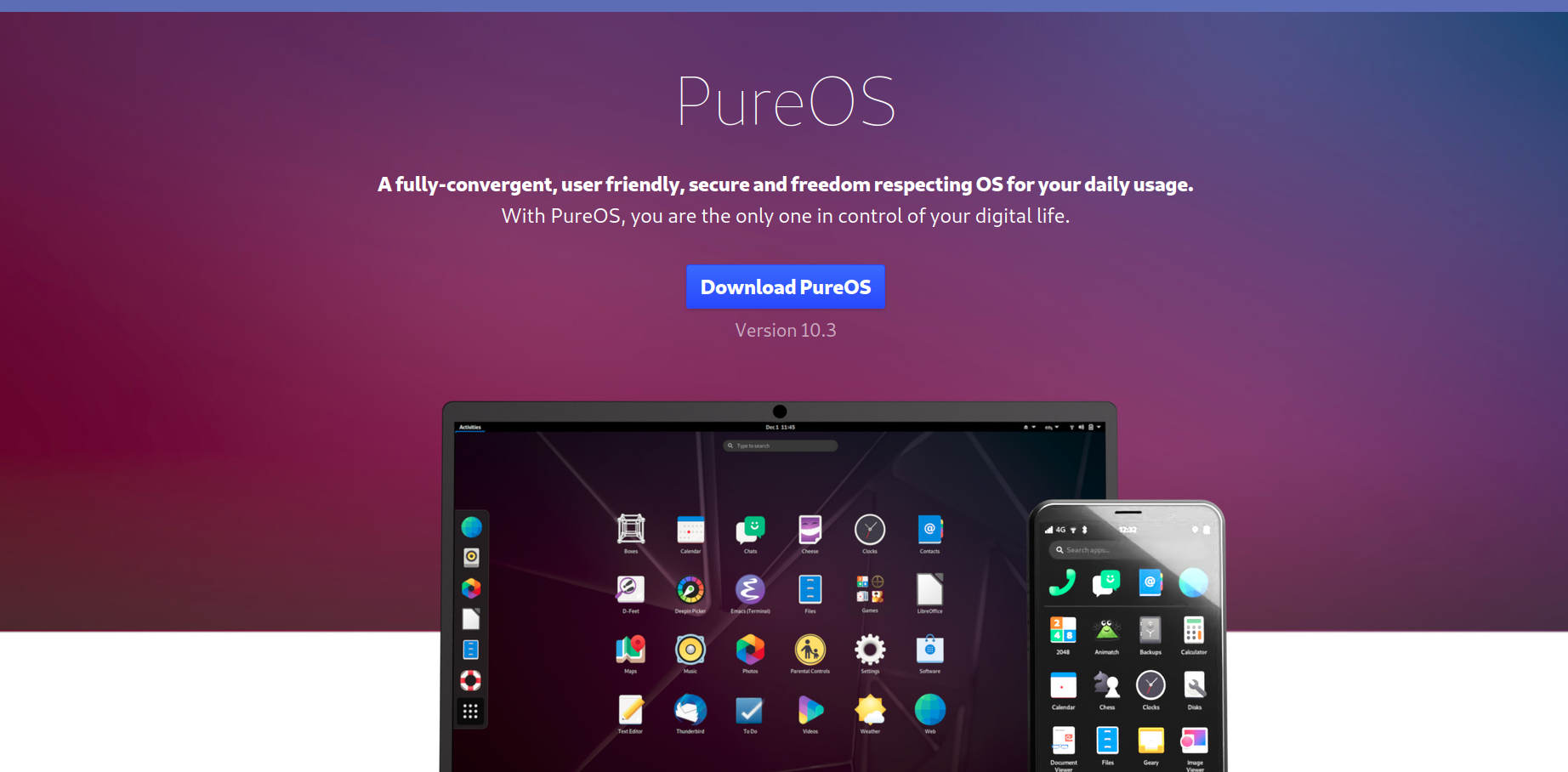
The Linux universe is as broad as it is diverse, and within this fascinating ecosystem, there are distributions that strive for more than just functionality: they seek to become true champions of privacy and freedom. One of the most talked-about distros in this regard is PureOS, embraced by both free software enthusiasts and users who prioritize data control and protection above all else.
But what makes PureOS special? Is it really worth choosing this alternative over other popular distributions like Debian or Ubuntu? If you're curious and want to learn all the ins and outs of PureOS, here's a detailed guide that covers its origins, technical features, advantages, limitations, and much more, using clear and accessible language so you don't get lost in technical jargon.
What is PureOS and who develops it?
PureOS is a completely free GNU/Linux distribution, developed and maintained by the technology company Purism (visit the official site here). Its philosophy focuses on absolute respect for privacy, security, and software transparency, eliminating any trace of proprietary code or firmware. PureOS derived from Debian, specifically from the “Testing” branch, mixing modernity with stability under the premise of total user freedom.
The Free Software Foundation (FSF) officially endorses PureOS as one of the few 100% free operating systems., entirely composed of auditable, modifiable and redistributable software, thus guaranteeing the four essential freedoms of free software. This recognition places PureOS among the small group of FSF-approved distributions, making it a benchmark for activists, developers, and users concerned about protecting their data and digital rights.
PureOS Philosophy and Main Objectives
PureOS was born with a clear mission: to offer an ethical, privacy-oriented, robust and easy-to-use operating system.According to information gathered from specialized sources and the project's own documentation, the five main pillars of PureOS are:
- Usability: A system accessible to both novice and advanced users, with an intuitive GNOME-based interface and standard Debian tools.
- Stability: Built on the reliable Debian foundation, PureOS ensures stability in your applications and updates, avoiding risky experiments.
- Privacy policy: From the initial installation, The system is designed to protect user information as much as possible, using encryption technologies, default isolation, and advanced privacy settings.
- Convergence: PureOS works as a cross-platform operating system Designed for computers, tablets and smartphones, although its flagship integration occurs in Purism devices such as the Librem laptops and the Librem 5.
- Freedom: It does not include any proprietary components or closed firmware., allowing users to copy, modify, audit and distribute the system on any compatible hardware.
Differences from Debian and other popular distros
One of the most frequently asked questions is how PureOS differs from Debian or other Linux operating systems.Although PureOS is heavily based on Debian, it introduces key differences:
- Does not use proprietary software or firmware in any component, something that Debian allows through the "non-free" repositories. PureOS positions itself as an uncompromising option for freedom, although this limits hardware support and application variety.
- Their repositories are carefully curated to exclude software with licenses that do not respect essential freedoms or may compromise privacy.
- It incorporates PureBrowser (derived from Firefox ESR) as its main browser, configured to block trackers and protect the user's identity., as well as the DuckDuckGo search engine by default to avoid typical Google commercial tracking.
- Includes advanced privacy and security tools, such as Tor Browser, HTTPS Everywhere, UBlock Origin and KeePassXC, ready to use after installation.
PureOS is Debian taken to the extreme of free purity, designed for those who prioritize technological ethics and privacy even at the expense of some conveniences in terms of hardware compatibility or software variety.
Main technical characteristics of PureOS
PureOS is built around a "clean" Debian Testing system., operating under a continuous release model. Let's break down its main technical features:
- GNOME desktop environment as standard (in recent versions, the distribution uses GNOME 3.38), notable for its modern design, ease of access, and high degree of internationalization. It allows for fluid management of windows, desktops, and applications, with solid support for Wayland.
- Package management using APT and graphical tools such as Synaptic or the GNOME Software Center, making it easier to install, update and uninstall programs.
- It comes pre-installed with a carefully chosen set of applications: LibreOffice (office software), Rhythmbox and Totem (multimedia), Kodi (entertainment), Polari IRC, Boxes (virtualization, alternative to VirtualBox), Calculator, Calendar, and other useful tools from the GNOME ecosystem.
- Advanced integration with Purism hardwareLibrem laptops and the Librem 5 phone feature optimized PureOS, providing physical security features (kill switches for webcam, microphone, and wireless networking) and support for Coreboot in the BIOS.
- Automatic disk and file encryption system from installation, allowing user data to remain protected even if the device falls into the wrong hands.
Privacy and Security Policy: Beyond Marketing
PureOS doesn't just promise privacy, it implements it from the root. From the choice of browser to the way each application is isolated, The system is focused on ensuring that user information remains secure and under their control.Some of the most notable measures and technologies include:
- Blocking trackers and fingerprinting with pre-installed extensions in PureBrowser or directly in Tor Browser.
- Using DuckDuckGo by default as a search engine, bypassing the massive data collection carried out by Google, Bing and the like.
- Optional but recommended encryption of the entire file system during installation, ensuring confidentiality against any unauthorized access attempt.
- Secure local password management with KeePassXC, avoiding cloud synchronizations if the user wishes.
- Access to your own VPN (Librem Tunnel) and other anonymity options, as well as easy integration of external VPN clients and email encryption with Enigmail and GPG.
- Support for secure boot technologies such as Coreboot and Heads (on Purism hardware), minimizing the risks of rootkits or malicious access during the boot process.
Limitations and Challenges: What You Need to Know Before Installing PureOS
The commitment to 100% free software has obvious advantages, but also certain drawbacks that must be considered before adopting PureOS as the main system.. For more information on hardware compatibility, we recommend you also review articles related to The best Linux alternatives to Windows 10.
- Limited hardware compatibility: It doesn't include drivers or proprietary firmware, which can complicate the recognition of WiFi cards, printers, or specific devices, especially from brands like Broadcom or certain Intel variants. To avoid any problems, it's advisable to consult pages like H node before installing, or pre-testing the system in live mode.
- Smaller software repositories: Without access to the vast repertoire of non-free or contrib applications like Debian, you'll have to look for free alternatives to popular programs like Discord, Skype, or Visual Studio Code, although integration with Flatpak and AppImage helps to alleviate this shortcoming.
- Somewhat more outdated software: By prioritizing stability and freedom, some versions of programs and GNOME itself may be several editions behind the most recent. However, this results in greater robustness and less bug exposure in the graphical environment.
- Lack of official support for 32-bit architectures: PureOS is focused on modern hardware, so older computers are out of the game.
It is important to emphasize that, although the advanced user can add non-free Debian repositories to 'free up' specific hardware, doing so contradicts the philosophy of PureOS and turns it, for all practical purposes, into just another Debian, thus losing its raison d'être.
Installation process and first impressions
Installing PureOS is a simple process, very similar to Fedora, and much more intuitive than the older Debian or Mint installers.
- Minimum Requirements: 64-bit processor, at least 1 GB of RAM and 15 GB of free disk space.
- The system can be booted from DVD or USB, using standard methods such as Imgburn, UltraISO or the command dd on GNU/Linux. Once started, the installer guides you step by step, allowing you to configure the language, keyboard, partitions, and disk encryption.
- Selecting the installation disk and the location of the boot sector can be a bit of a headache. if you have multiple internal drives, so pay attention to that screen.
- On some computers, especially with Intel or Broadcom WiFi cards, PureOS may not recognize the wireless network if it requires proprietary firmware.In these cases, you'll either only have a wired network or you'll have to sacrifice purity and install drivers manually from the non-free Debian repositories (not recommended if you want to maintain the essence of PureOS).
Upon completion of the installation, the GNOME desktop looks clean and lightweight, with simple menus and direct access to all essential tools, from the LibreOffice suite to the privacy-focused browser.
User experience and recommended use cases
Despite its radical approach to freedom, PureOS doesn't sacrifice ease of use.The system is optimized to serve as a daily platform for office work, web browsing, communication, and free entertainment:
- Not the ideal choice for games or proprietary professional software, but for those looking for a risk-free environment, hidden telemetry, and trackers, it is one of the best alternatives.
- The GNOME desktop, slightly modified (you can install extensions like Dash to Dock to set the menu to a Dock-style menu). Windows), is easy to customize and manage even for migrant users Windows the mac.
- The PureOS community, although small compared to giants like Ubuntu, is very active, collaborative and focused on support between users and developers.The official Purism forum and available documentation make it easy to troubleshoot or customize the system to your needs.
- Perfect for activists, developers, journalists, ethical hackers and users who want complete independence from large corporations..
PureOS and Purism hardware: a winning combination
Where PureOS shines is on devices designed and sold by Purism. (). Laptops like the Librem 14 and smartphones like the Librem 5 have been developed to maximize security and privacy, integrating
- Physical switches to disable camera, microphone and wireless radio, blocking the hardware at the electronic level.
- Free BIOS Coreboot and verified boot with Heads, minimizing risks of threats in the bootloader.
- Optimized support for all free drivers, ensuring that the system operates without binary blobs.
This integration makes PureOS and Purism hardware one of the best options for those seeking end-to-end privacy and security in an open, controllable, and auditable environment.
Updates, maintenance and support
Package and update management in PureOS is simple and based on Debian tools.. The system uses the classic command apt and has graphical managers for those who don't want to mess around with the terminal. Plus:
- PureOS stable releases are regularly synchronized with Debian Testing, so you can expect regular updates, security patches, and incremental improvements to the base system and its applications.
- Access to Flathub allows you to install many recent free applications via Flatpak, compensating for the shortcomings of the repository itself.
- Purism's official support and documentation, along with the global community, ensure help for both novice and expert users.In addition, there are specific communication channels for reporting bugs, contributing to development, or resolving highly technical questions.
Who is PureOS for and is it worth the upgrade?
PureOS is for you if you're looking for a proprietary software-free operating system with a radical focus on privacy and security.. It is an excellent option for those who use personal or professional computing without requiring proprietary applications that only run on Windows or macOS. It's also ideal if you have Purism devices or want to control every detail of your digital environment.
Of course, if you rely on specific hardware that only works with closed drivers, or need very specific programs like online banking with proprietary modules, you'll need to consider your priorities before jumping into PureOS.
Exploring PureOS means entering an environment where privacy and freedom take precedence over convenience or absolute compatibility. The system offers a polished, stable, and secure experience for both the average user and the most data-conscious. Using PureOS means embracing a philosophy of total control over technology, with the guarantee of being backed by a committed community and a brand like Purism that puts ethics at the heart of computing.

Experts in software, development, and applications for industry and home use. We love leveraging the full potential of any software, program, app, tool, and operating system on the market.